ReplitAI app-building platformClaudeClaude Code coding tool
A rival-tool claim followed by an animated website demo
A creator-led software demo hooks viewers with a rival-tool challenge, then shows an animated website before revealing a prompt-based workflow.
- Views
- 48.5K
- Likes
- 823
- Comments
- 157
- Length
- 11s
Observed : 48,513 views, 823 likes, 157 comments. Published . An Instagram view is a play of a video (Reels); images and carousels have no views.
First 3 seconds
- Visual
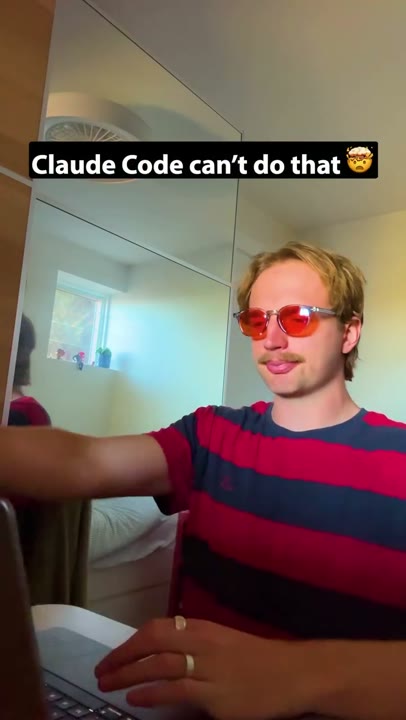
- The creator opens their mouth excitedly while seated at a laptop, then the view switches to the screen showing an exploded 3D phone model.
- On-screen text
- “Claude Code can’t do that 🤯”
- Spoken line
- None: no speech in the opening
- Sound
- The prior analysis reports upbeat rhythmic music; narration is unverified because the transcript detects no speech.
Script beats
An expressive creator opens the laptop beneath the rival-tool claim.
Make a provocative comparison immediately legible and add an expressive human entry point
The laptop displays an exploded phone model, separated internal panels, and a close-up lens assembly.
Show an impressive result that invites viewers to discover the tool and workflow behind it
A software interface contains entered text beneath 'What will you build?' with the overlay 'Paste in prompt'.
Present the result as accessible through a simple input step
A loading screen appears beneath 'Let it cook'.
Compress the generation process into a brief waiting beat
The creator returns in a selfie shot, pointing toward the instruction to comment for the prompt.
Turn interest in recreating the result into comments
Why it works
- Competitive provocation. Naming Claude Code gives the claim a specific target and invites agreement, disagreement, or curiosity about the alternative.
- Early visual payoff. The animated website appears within the opening three seconds, giving viewers a concrete result to evaluate; it does not establish the competitor's actual limitations.
- Result before process. The polished visual comes before the input and loading steps, making the workflow worth watching.
- Recreation incentive. Offering the prompt connects the comment request directly to what viewers have just seen.
How to adapt it
- Comparison claim. Use a supportable comparison such as 'My old editor needed five steps for this' for an editing app or 'My usual planner never showed this' for a planning tool.
- Visible result. Replace the 3D website with an automatically captioned clip, an organized task dashboard, or a photo background removal.
- Simple process. Show 'Upload your clip' then 'Generate captions', or 'Add your tasks' then 'Build the schedule'.
- Comment reward. Offer the exact editing preset, dashboard template, or prompt used to create the demonstrated result.
- Keep intact.
- Put the specific challenge in readable text from the first frame
- Show the relevant result within roughly three seconds
- Follow the result with a short, understandable workflow
- Make the requested comment unlock something useful for recreating the result
Pattern template
[Tool or old method] can’t [specific result] → show the result → show [simple input] and [processing step] → comment “[keyword]” for [recreation resource].
Keywords and tags
- Audience
- People interested in AI coding tools and creating visually impressive websites
- Angles
- Curiosity, Surprise, Aspiration
- Call to action
- comment “prompt” if u want it; the caption also directs viewers to the link in bio to make their own.
- Sound
- Unknown
Video and caption by @jakymakey; original post on Instagram. Breakdown by UGC Growth Engineer, added .