ChatGPTAI chat assistantWronAI no-code app builderUnbrandedAI Packing Assistant app
A No-Code App Claim Followed by a Screen Walkthrough
A creator pairs an 'I built an app without coding' claim with a surprised reaction, then shows an AI app-building walkthrough to satisfy curiosity.
- Views
- 44.7K
- Likes
- 392
- Comments
- 24
- Length
- 17s
Observed : 44,729 views, 392 likes, 24 comments. Published . An Instagram view is a play of a video (Reels); images and carousels have no views.
First 3 seconds
- Visual
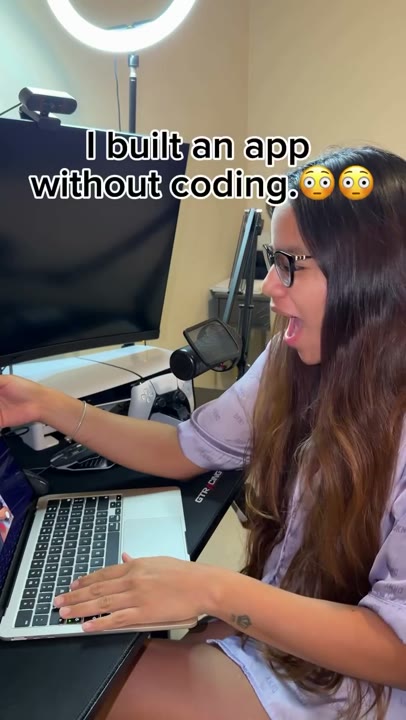
- The creator sits beside an open laptop, opens their mouth in surprise, covers it with one hand, and partly closes the laptop before a cut to ChatGPT around second 3.
- On-screen text
- “I built an app without coding.😳😳”
- Spoken line
- None: no speech in the opening
- Sound
- Upbeat music with sung or rapped vocals; no creator voiceover, according to the prior analysis.
Script beats
A bold no-code app claim appears over the creator's escalating surprised reaction.
Promise a desirable outcome while removing the perceived coding barrier
The camera cuts to ChatGPT and a list of app ideas, including an AI Packing Assistant.
Begin answering how the claimed result was achieved
The laptop displays an AI app-building platform and its App Builder navigation.
Introduce the tool used to turn the idea into an app
An AI Packing Assistant prompt and build progress appear under an instruction to copy the ChatGPT idea.
Make the workflow look concrete and repeatable
A mobile app preview shows wardrobe items, categories, and packing-related settings.
Provide a visible result supporting the opening claim
The app preview remains visible with a request to comment 'App' for the link.
Convert interest in the demonstrated result into comments
Why it works
- barrier removal. The headline offers app creation without the skill viewers may assume it requires.
- emotional amplification. The hand-over-mouth reaction makes the achievement feel surprising before the tutorial begins.
- claim followed by evidence. The quick transition to software screens gives viewers a reason to stay and inspect the process.
- visible payoff. The generated app preview closes the curiosity gap, although these frames do not establish that every feature works.
How to adapt it
- Outcome and removed barrier. For a design app: 'I made a logo without design skills.' For a meal-planning app: 'I planned a week of dinners without a spreadsheet.'
- Proof sequence. Show a design prompt becoming a logo, a recipe preference becoming a meal plan, or a website brief becoming a page preview.
- Reaction. Use a surprised smile, a pause followed by looking at the camera, or a hand-over-mouth response that fits the creator's delivery.
- Final action. Ask viewers to comment 'Template' for a design resource or 'Plan' for a meal-planning example, with an available resource behind the offer.
- Keep intact.
- Put the specific outcome and removed barrier in the first frame
- Pair the headline with an immediately readable reaction
- Move from reaction to process evidence by approximately second 3
- Show a result that directly supports the opening claim
Pattern template
I [achieved outcome] without [expected skill or barrier] → surprised reaction → show [tool and key steps] → reveal [result] → [CTA].
Keywords and tags
- Audience
- People interested in creating apps without coding skills
- Angles
- Curiosity, Surprise, Aspiration
- Call to action
- Comment "App" for the link
- Sound
- Music only
Video and caption by @maicreates.ugc; original post on Instagram. Breakdown by UGC Growth Engineer, added .