HaloAI photo-editing app
Red-light photo question followed by an editing reveal
A photo-editing tutorial hooks viewers with a red-lit portrait and a how-to question, then reveals the neutral original before demonstrating an AI editing app.
- Views
- 39.5K
- Likes
- 4.8K
- Comments
- 30
- Length
- 12s
Observed : 39,483 views, 4,774 likes, 30 comments. Published . An Instagram view is a play of a video (Reels); images and carousels have no views.
First 3 seconds
- Visual
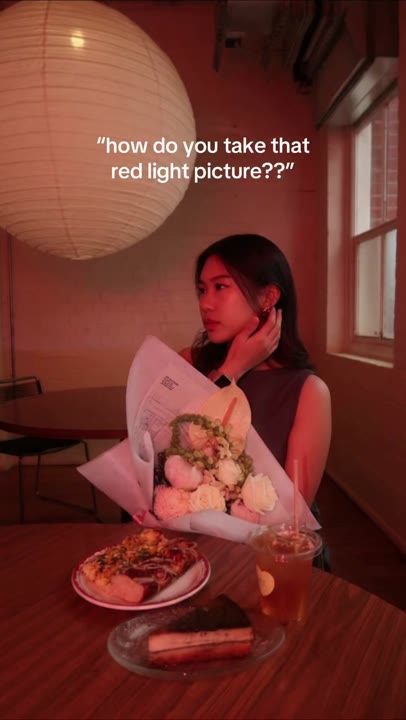
- The creator poses with a bouquet at a cafe table in a red-tinted portrait; around 2.9 seconds, the same composition appears in neutral lighting.
- On-screen text
- “"how do you take that red light picture??" i don’t 😛🤞🏻”
- Spoken line
- None: no speech in the opening
- Sound
- Continuous hip-hop/R&B background music without spoken voiceover, according to the prior analysis.
Script beats
Show the red-tinted cafe portrait with the question about taking a red-light picture.
Present a desirable result and open a question about how it was achieved
Reveal the neutral-looking original portrait and add 'i don’t' with playful emojis.
Subvert the assumed lighting setup and redirect curiosity toward editing
Show a phone editing interface with the original photo and a prompt field.
Introduce the practical workflow behind the result
Display Halo branding and the instruction to go to halo ai and copy the prompt.
Identify the app and connect the effect to a repeatable editing process
Return to the red-tinted portrait with 'comment “prompt” and i’ll send u'.
Reinforce the finished result and encourage comments to receive the prompt
Why it works
- Unresolved method. The opening shows the desired photo while withholding how it was made, giving viewers a reason to continue.
- Expectation reversal. The neutral original and 'i don’t' response challenge the assumption that the creator used red lighting.
- Visible comparison. Keeping the portrait composition consistent makes the editing effect immediately understandable.
- Useful payoff. The app interface and prompt offer a concrete way to recreate the aesthetic.
How to adapt it
- Desired photo effect. For an editing app, swap red lighting for golden-hour warmth, a film-camera look, or a studio-style background.
- Opening question. Use 'how do you get that sunset product shot??' or 'how do you take those studio jewelry pictures??' over the finished image.
- Subject and setting. Photograph a skincare bottle on a bathroom shelf, sneakers on a desk, or a coffee bag on a kitchen counter.
- Workflow payoff. Show the featured app applying a preset or entering an editing prompt, then return to the finished image.
- Resource CTA. Offer the exact preset, lighting recipe, or editing prompt through a comment keyword.
- Keep intact.
- Show the desirable finished image immediately
- Pair the result with a clear question about how it was achieved
- Reveal the ordinary original within roughly three seconds
- Keep the composition consistent so the contrast is easy to read fully on mute
Pattern template
"how do you take that [desired look] picture??" → finished image → "i don’t [emoji]" + original image → [editing tool/process] → comment "[resource]" CTA
Keywords and tags
- Audience
- Creators who want dramatic photo aesthetics using phone-based editing tools
- Angles
- Curiosity, Surprise, Aspiration
- Call to action
- comment “prompt” and i’ll send u
- Sound
- Music only
Video and caption by @madebyshanon; original post on Instagram. Breakdown by UGC Growth Engineer, added .