VizardAI video creation softwareCanvadesign softwareClaudeAI assistantUnbrandedimage editing software represented by a Ps iconUnbrandedmotion graphics software represented by an Ae icon
Stressed vs. Relaxed Editors: A Side-by-Side Software Hook
A side-by-side editing skit contrasts a stressed creator with a relaxed one, then reveals an AI video tool as the shortcut behind the easier workflow.
- Views
- 45.1K
- Likes
- 2.3K
- Comments
- 27
- Length
- 23s
Observed : 45,091 views, 2,287 likes, 27 comments. Published . An Instagram view is a play of a video (Reels); images and carousels have no views.
First 3 seconds
- Visual
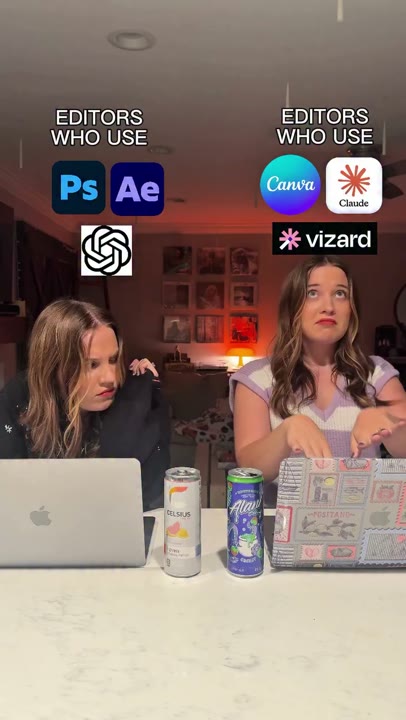
- Two creators work behind laptops at a kitchen counter beneath different software logos; the left creator hunches with a furrowed brow while the right gestures casually, followed by a laptop-screen close-up.
- On-screen text
- “EDITORS WHO USE / VS. / EDITORS WHO USE”
- Spoken line
- None: no speech in the opening
- Sound
- Upbeat background music and keyboard typing effects, according to the prior analysis; no opening speech is reported.
Script beats
Software logos label two editor workflows while stressed and relaxed performances play side by side.
Make the comparison immediately legible and invite viewers to recognize their own workflow
A filmed laptop close-up shows the Vizard agent interface and its creation prompt.
Connect the relaxed performance to a concrete software product
The counter scene resumes with continued frustration on the left and casual gestures on the right.
Reinforce the emotional difference between the two workflows
The right creator reacts excitedly to the work while the left remains tense; the transcript includes an excited remark.
Build the payoff around confidence and apparent completion
Dialogue expresses surprise at finishing already and asks how many videos were made; the right creator rests their head on a hand.
Frame the product benefit as faster completion through a conversational reaction
The comparison gives way to vintage-style end-title imagery, including a Photoshop icon at 21.37 seconds.
Close with a comic end-card flourish; the precise transition is not shown in the supplied frames
Why it works
- Instant visual comparison. Matching laptops and a shared setting let opposing expressions carry the difference without an opening explanation.
- Audience self-recognition. The repeated editor label and recognizable software icons help editing audiences identify a familiar workflow.
- Benefit made emotional. Frustration versus ease makes the implied time-saving benefit understandable before any detailed feature explanation.
- Early product reveal. The interface insert around three seconds gives viewers a concrete tool to associate with the relaxed side.
How to adapt it
- Competing workflows. Compare manually sorting receipts with an expense app, or copying meeting notes with a transcription tool.
- Visible emotional contrast. Show one creator repeatedly checking a spreadsheet while the other closes their laptop after using an automation product.
- Product insert. Cut to an actual categorized receipt, generated meeting summary, or completed video export around three seconds.
- Completion payoff. Have the struggling character ask 'You're finished already?' before revealing a verifiable completed task.
- Keep intact.
- Establish both workflows together in the opening frame
- Make the labels readable and the emotional contrast obvious
- Give both sides the same recognizable task
- Reveal the featured tool early and connect it to a visible outcome
Pattern template
[People] using [workflow A] vs. [workflow B] → stressed versus relaxed performance → [product interface] → surprised reaction to [completed task].
Keywords and tags
- Audience
- Video editors and content creators comparing editing workflows and AI tools
- Angles
- Relatability, Humor, Curiosity
- Call to action
- which team are you on? 🤭
- Sound
- Voice and music
Video and caption by @contentwithmik; original post on Instagram. Breakdown by UGC Growth Engineer, added .