Unbrandedvideo editing course
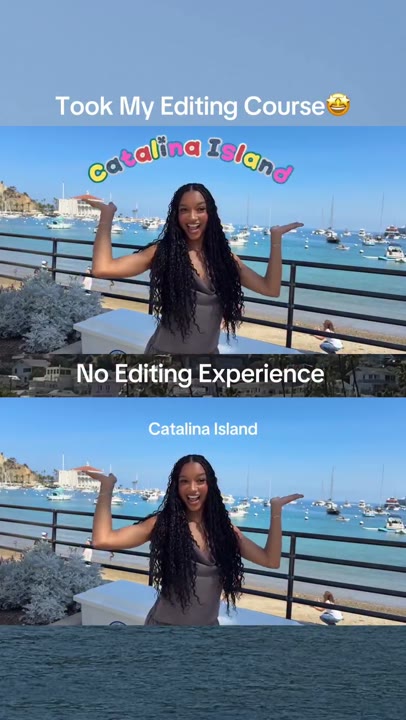
Same Footage, Two Editing Levels in a Stacked Comparison
A stacked travel-video comparison hooks viewers by showing colorful course-level edits above a simpler version of the same footage to promote an editing course.
- Views
- 429K
- Likes
- 22.1K
- Comments
- 4.9K
- Length
- 14s
Observed : 429,152 views, 22,074 likes, 4,919 comments. Published . An Instagram view is a play of a video (Reels); images and carousels have no views.
First 3 seconds
- Visual
- Two stacked versions show the creator gesturing beside a harbor; the upper version adds colorful curved lettering and a boat sticker while the lower uses plain text.
- On-screen text
- “Took My Editing Course🤩 / No Editing Experience / Catalina Island”
- Spoken line
- None: no speech in the opening
- Sound
- Upbeat rhythmic music with apparent sung vocals; no verified creator dialogue.
Script beats
Stack matching harbor footage beneath contrasting editing-experience labels; introduce animated lettering and a boat sticker above the simpler version.
Make the difference in editing immediately visible
The upper panel transitions into the coffee scene first, using large lettering, additional drink text and layered transitions; the lower panel follows with a plain caption.
Demonstrate differences in timing, typography and transitions
Continue through shopping footage, with cutout graphics and decorative elements in the upper panel and simpler footage below.
Show that the editing contrast extends across several scenes
Compare harbor and boardwalk shots as the two versions progress at different speeds.
Sustain visual variety while keeping the comparison labels visible
Finish with the upper panel returning to the opening harbor gesture while the lower shows a boardwalk pose.
Maintain the comparison through the ending and suggest a visual loop in the upper edit
Why it works
- simultaneous comparison. Both editing levels are visible together, so viewers can judge the difference without remembering an earlier shot.
- controlled source footage. Matching footage makes editing choices, rather than the location or performance, the focus.
- visible proof. Animated lettering, stickers and transitions illustrate the course's implied benefit instead of relying only on a claim.
- aspiration. The beginner label gives aspiring creators a clear skill gap they may want to close.
How to adapt it
- featured offer. Compare edits made with a video-editing course, a captioning app or a downloadable transition pack.
- comparison labels. Use 'With [editing tool]' versus 'Basic phone edit', or 'After [course]' versus 'Before [course]' when the comparison is accurate.
- source footage. Use the same skincare routine, café visit or outfit try-on in both panels.
- demonstrated improvements. Show animated product labels, tracked captions, product cutouts or smoother scene transitions in the enhanced version.
- Keep intact.
- Show both versions together from the opening frame
- Use matching source footage so viewers can isolate the editing difference
- Keep the comparison labels readable and persistent
- Show a noticeable improvement within the first three seconds
Pattern template
[With course/tool] above [beginner/basic version] → same footage → immediate visible editing difference → several comparison examples.
Keywords and tags
- Audience
- beginner content creators interested in improving their video editing
- Angles
- Curiosity, Aspiration, Satisfaction
- Sound
- Music only
Video and caption by @amiahkailee; original post on Instagram. Breakdown by UGC Growth Engineer, added .