ChatGPTAI chat applicationHiggsfieldAI plugin
Skeptical AI Question Followed by a Hands-On Demo
A skeptical selfie reaction opens a question about an AI tool, then a step-by-step software demo keeps viewers watching for the result.
- Views
- 314K
- Likes
- 11.7K
- Comments
- 1.7K
- Length
- 28s
Observed : 314,298 views, 11,676 likes, 1,748 comments. Published . An Instagram view is a play of a video (Reels); images and carousels have no views.
First 3 seconds
- Visual
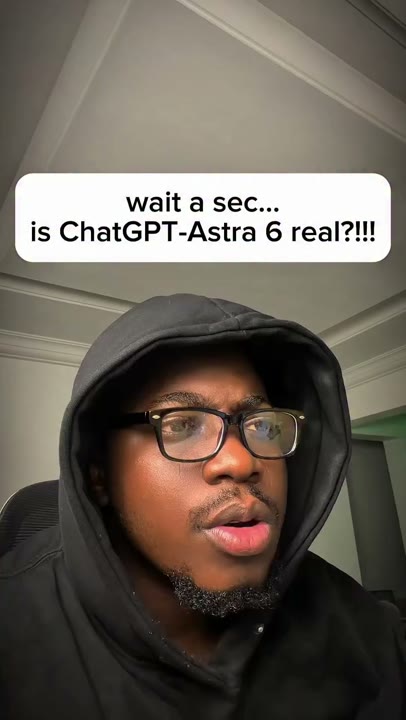
- The creator looks toward an off-camera screen with furrowed brows and a slightly open mouth, then lifts and removes their glasses.
- On-screen text
- “wait a sec... is ChatGPT-Astra 6 real?!!!”
- Spoken line
- None: no speech in the opening
- Sound
- Continuous upbeat electronic music, according to the prior analysis; the transcript detects no speech.
Script beats
A skeptical close-up accompanies the question about whether ChatGPT-Astra 6 is real; the creator removes their glasses.
Create an unresolved question and express the viewer's possible disbelief
The prior analysis reports photographing a toy car; the 5-second frame shows chatgpt.com beneath 'Go to ChatGPT'.
Move from skepticism into a concrete process
A car image appears in the chat interface beneath 'Upload your Image'.
Show the input and make the workflow easy to follow
The creator shows a game-building prompt beneath 'Paste this Prompt', with a comment-to-get-it overlay; the submitted prompt appears by 16.39 seconds.
Explain the transformation and offer access to the prompt
A car-driving game appears on the monitor beneath 'Crazy!😱😱🔥'.
Deliver a visible result that answers the opening curiosity
Gameplay continues with 'Comment “Astra” to get it'.
Turn interest in the result into comments
Why it works
- Unresolved question. The opening asks whether the named tool is real without immediately answering, giving viewers a reason to stay for evidence.
- Visible skepticism. The furrowed brows, open mouth and glasses removal make the text feel like a reaction to something surprising.
- Input-to-result progression. A car image, a prompt and a driving-game result form an understandable sequence that rewards continued viewing.
- Useful takeaway. The prompt offer gives viewers a concrete reason to comment after seeing the result.
How to adapt it
- Opening capability question. For a cleaning product: 'wait a sec... can this lift dried coffee?'; for an editing app: 'wait a sec... can this fix my blurry clip?'
- Demonstration input. Use a stained mug for a cleaner, a dim selfie for a photo app, or a messy drawer for an organizer.
- Proof sequence. Show stain → application → clean surface, or original clip → app settings → edited result.
- Comment reward. Offer the exact editing settings, a recipe used with a kitchen appliance, or a setup checklist for a software tool.
- Keep intact.
- Put the unresolved capability question on screen immediately
- Pair the question with a readable skeptical reaction
- Cut quickly from the reaction into a concrete demonstration
- Show both the input and the result so viewers can understand the transformation
Pattern template
“wait a sec... can [product] really [surprising capability]?” → skeptical reaction → [input and steps] → [visible result] → [useful takeaway CTA]
Keywords and tags
- Audience
- People curious about AI tools and image-to-game workflows
- Angles
- Curiosity, Surprise
- Call to action
- Comment “Astra” to get it
- Sound
- Music only
Video and caption by @the.rexcodes; original post on Instagram. Breakdown by UGC Growth Engineer, added .