Poseracamera app with pose-reference overlays
A Secret-Keeping Selfie Opens a Camera App Demo
A selfie with a “don’t tell anyone” overlay creates curiosity about a camera app, then resolves it with a pose-overlay demonstration and final photo.
- Views
- 128K
- Likes
- 4.6K
- Comments
- 92
- Length
- 15s
Observed : 127,916 views, 4,634 likes, 92 comments. Published . An Instagram view is a play of a video (Reels); images and carousels have no views.
First 3 seconds
- Visual
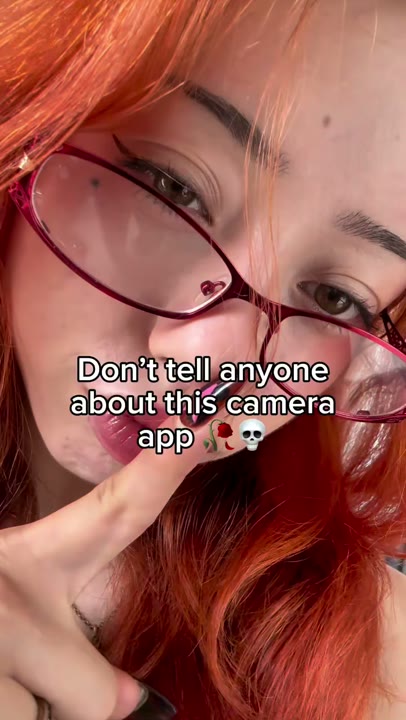
- The creator holds a finger against their lips, winks, and looks into the camera through red glasses as the tight selfie framing gradually widens.
- On-screen text
- “Don’t tell anyone about this camera app 🥀💀”
- Spoken line
- None: no speech in the opening
- Sound
- A melodic song with sung vocals plays; the prior analysis reports no spoken voiceover.
Script beats
A close-up selfie pairs a finger-to-lips gesture and wink with the secret-camera-app overlay.
Create an unresolved question about which app deserves the secrecy
Switch to the phone’s App Library and locate the app; the prior analysis identifies the search as Posera.
Begin resolving the app-name reveal while moving into practical proof
Show Posera’s camera interface and browse reference portraits to select a pose.
Explain the app’s pose-reference function visually
Display a reference pose over the live camera and reduce its opacity; the 11.2-second frame shows 46%.
Demonstrate how the creator can align with a reference pose
Reveal the creator’s finished portrait without the app interface.
Provide a visible payoff for watching the demonstration
Why it works
- Withheld identity. The opening names the product category but withholds the app name, giving viewers a specific question to resolve.
- Playful exclusivity. “Don’t tell anyone” frames an ordinary recommendation as privileged information, reinforced by the finger-to-lips gesture.
- Visual reinforcement. The wink, direct eye contact, and readable overlay communicate the same secret-sharing idea without needing voiceover.
- Demonstration payoff. The app interface, opacity adjustment, and final portrait give the teasing introduction a concrete resolution.
How to adapt it
- Product category. Use “this editing app,” “this heatless curler,” or “this packing tool,” then reveal the actual product promptly.
- Proof sequence. For an editing app, show one adjustment and its output; for a curler, show wrapping and the released curl; for a packing tool, show compression and the packed bag.
- Opening performance. Pair the secrecy overlay with a small wink, a finger to the lips, or a conspiratorial glance in a simple phone selfie.
- Final result. End on an exported photo, a finished hairstyle, or the organized suitcase so viewers see what the product enables.
- Keep intact.
- Make the secret-sharing premise readable immediately
- Name the product category while briefly withholding its identity
- Match the creator’s gesture to the playful secrecy of the text
- Transition quickly from the tease to a clear product demonstration and visible result
Pattern template
“Don’t tell anyone about this [product category]” + [secret-sharing gesture] → [product reveal] → [one useful feature in action] → [finished result].
Keywords and tags
- Audience
- People seeking selfie pose ideas and tools for recreating reference photos.
- Angles
- Curiosity, Fomo, Aspiration
- Call to action
- The caption asks viewers to send the Reel to someone who often has blurry photos.
- Sound
- Music only
Video and caption by @lanadrake.photo; original post on Instagram. Breakdown by UGC Growth Engineer, added .