PicsartPicsart Flow AI creation toolYouTubevideo platform
- Open loop
- Tutorial
- Apps and software
- Possibly AI footage
A Quoted Viewer Request Leads Into a Video Creation Workflow
A selfie tutorial hooks viewers with a quoted request to make YouTube videos, then demonstrates an AI video workflow in Picsart Flow.
- Views
- 44.6K
- Likes
- 1.1K
- Comments
- 456
- Length
- 20s
Observed : 44,626 views, 1,060 likes, 456 comments. Published . An Instagram view is a play of a video (Reels); images and carousels have no views.
First 3 seconds
- Visual
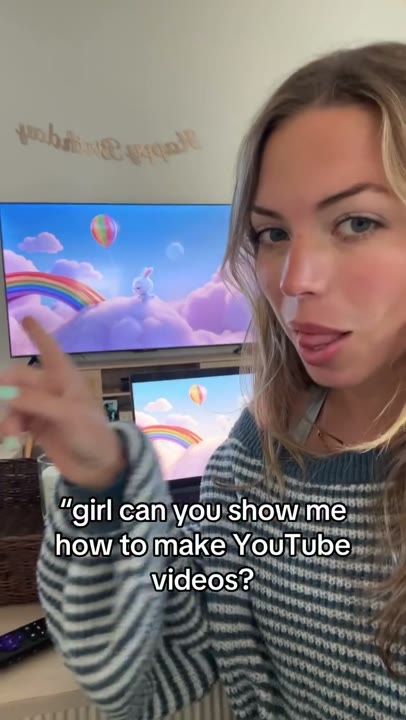
- The creator rests a finger against her chin, looks into the camera, then gestures toward a TV and laptop displaying pastel rainbow animation.
- On-screen text
- ““girl can you show me how to make YouTube videos?”
- Spoken line
- None: no speech in the opening
- Sound
- An upbeat hip-hop track with recorded vocals plays; no creator speech is supported.
Script beats
Selfie opening pairs a thoughtful pose and pointing gesture with a quoted request to make YouTube videos.
Create an unresolved how-to request while showing a preview of the result
Handheld screen shots show the Sheriff Labrador YouTube channel and its video grid under 'Find a kids channel'.
Give viewers a concrete reference for the content format
The creator points to Picsart Flow and a prompt interface while the overlay instructs viewers to start a new workflow and type a prompt.
Turn the opening request into a visible software workflow
The rainbow animation fills the TV and laptop screens, followed by a comment-for-prompt CTA.
Show the output and invite viewers to request the prompt
Why it works
- unresolved request. The quoted audience question promises an answer that the viewer must keep watching to obtain.
- result preview. The colorful animation behind the creator makes the promised video output visible before the tutorial begins.
- approachable instruction. A casual selfie and physical pointing gestures make the screen workflow feel accessible.
How to adapt it
- Quoted request. For a design app: 'girl can you show me how to make product photos?'; for a hair tool: 'girl can you show me how to get those waves?'
- Visible result. Show finished product images on a laptop, styled hair in the selfie, or a completed meal behind the creator.
- Workflow. Replace channel research and prompt entry with uploading a product photo, selecting a styling attachment, or preparing ingredients.
- Resource CTA. Invite viewers to comment 'photo' for a prompt, 'waves' for the styling routine, or 'recipe' for ingredient quantities.
- Keep intact.
- Make the quoted request readable immediately
- Show a relevant finished result in the opening
- Follow the request with concrete steps and a visible payoff
- Use gestures to direct attention to the result and key steps
Pattern template
“girl can you show me how to [desired result]?” → selfie with result preview → [product workflow] → finished result → comment [keyword] for [resource]
Keywords and tags
- Audience
- Aspiring creators who want to make animated YouTube videos using AI tools
- Angles
- Curiosity, Aspiration
- Call to action
- Comment “rainbow” and I’ll send you the prompt
- Sound
- Music only
Video and caption by @maggie.vidz; original post on Instagram. Breakdown by UGC Growth Engineer, added .