ElevenLabsElevenCreative AI image-generation tool
- Direct callout
- Demo
- Apps and software
- Possibly AI footage
Calling Out Flat-Lay Clothing Photos Before Showing an AI Fix
A text-led software demo calls out clothing resellers for boring listing photos, then shows an AI image tool turning a flat-lay photo into styled product scenes.
- Views
- 35.9K
- Likes
- 180
- Comments
- 24
- Length
- 18s
Observed : 35,894 views, 180 likes, 24 comments. Published . An Instagram view is a play of a video (Reels); images and carousels have no views.
First 3 seconds
- Visual
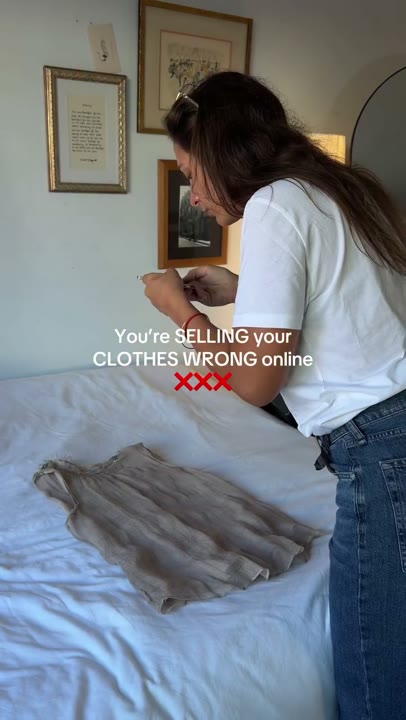
- The creator leans over a bed to photograph a beige sleeveless top, then turns toward the camera and raises an index finger in a warning gesture.
- On-screen text
- “You’re SELLING your CLOTHES WRONG online ❌❌❌”
- Spoken line
- None: no speech in the opening
- Sound
- No creator dialogue; the prior analysis reports upbeat pop music with female vocal melodies.
Script beats
The creator photographs clothing on a bed beneath a selling-mistake callout, then faces the viewer with a raised finger.
Identify clothing resellers and challenge a familiar listing-photo habit
An overhead view points at the flat-lay top with text labeling the photo too boring.
Make the claimed mistake concrete before introducing the alternative
A phone camera view shows the top, followed by the ElevenLabs interface; text directs viewers to take a picture and go to ElevenCreative.
Introduce the featured tool through a simple first step
The laptop shows a generation interface while an overlay instructs viewers to upload the image and let it cook.
Present the workflow as easy to follow
A grid reveals styled garment images, including hanging, worn, and detail views, alongside a comment-to-get-the-link CTA.
Deliver the visual payoff and convert interest into comments
Why it works
- audience self-recognition. The opening names clothing sellers while showing the ordinary act of photographing a garment on a bed.
- mistake aversion. The word WRONG and three red crosses suggest the viewer may be making an avoidable selling mistake.
- unresolved solution. The opening criticizes the current method before revealing how to improve it, creating a reason to keep watching.
- gesture reinforcement. Direct eye contact and the raised index finger visually reinforce the warning without requiring speech.
How to adapt it
- Audience and task. For a photo-editing app: 'You’re photographing your products WRONG'; for a storage brand: 'You’re packing your orders WRONG'.
- Visible beginner mistake. Show jewelry photographed against a cluttered counter, a mug shot in dim light, or an order packed with loose items.
- Product-assisted correction. Demonstrate a background-removal app, a tabletop lighting kit, or fitted packaging immediately after showing the problem.
- Visual payoff. Reveal the same necklace against a clean backdrop, the same mug under improved lighting, or the same order secured neatly.
- Response prompt. Use a relevant keyword such as 'Comment PHOTO for the setup' or 'Comment PACK for the checklist' when that resource is available.
- Keep intact.
- Name the audience’s task in the opening overlay
- Show the familiar behavior being criticized immediately
- Reinforce the warning with direct eye contact and a clear gesture
- Delay the solution briefly, then demonstrate it concretely
Pattern template
You’re [audience task] WRONG → show [common mistake] → turn to camera with a warning gesture → demonstrate [product-assisted fix] → reveal [improved result].
Keywords and tags
- Audience
- Clothing resellers and online sellers looking to improve their product photos
- Angles
- Relatability, Curiosity, Surprise
- Call to action
- Comment CREATE and I’ll send you the link 🔗
- Sound
- Music only
Video and caption by @eugecontentcreator; original post on Instagram. Breakdown by UGC Growth Engineer, added .