onemorepleaseappphoto and posing guide app
Relatable Photo Frustration Leads Into a Posing App Demo
A selfie and posing montage hooks viewers with the frustration of looking worse in photos, then introduces a free photo guide app through a screen demo.
- Views
- 28K
- Likes
- 438
- Comments
- 102
- Length
- 12s
Observed : 28,020 views, 438 likes, 102 comments. Published . An Instagram view is a play of a video (Reels); images and carousels have no views.
First 3 seconds
- Visual
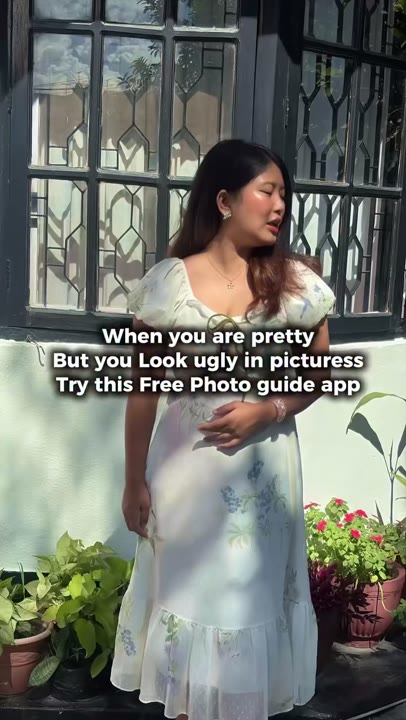
- The creator looks sideways in a close selfie, raises a hand to an open mouth by 0.5 seconds, then cuts to standing outdoors and sitting on a patio.
- On-screen text
- “When you are pretty But you Look ugly in picturess Try this Free Photo guide app”
- Spoken line
- None: no speech in the opening
- Sound
- Music accompanies the montage with no evidenced creator speech; the transcript suggests sung vocals, although the prior analysis describes instrumental music.
Script beats
Selfie shifts into a hand-to-mouth reaction beneath the photo-frustration overlay.
Invite immediate recognition of a familiar camera insecurity
Quick cuts show standing and seated posing attempts while the same overlay promises a free app.
Ground the problem in everyday photo situations and create curiosity about the solution
The video moves into a phone screen showing a reference photo and a menu with 'Download image'.
Introduce a concrete reference-image step
A pink app interface presents solo, paired and group posing options plus photo guides.
Show the app's range of relevant tools
A 'Prepare Your Pose' screen shows a reference subject outlined in white.
Make the pose-guidance feature visible
The creator performs playful poses on a rooftop terrace.
Close with an example of posing in practice
Why it works
- Self-recognition. The opening text names the gap between feeling attractive in person and disliking photographs, giving viewers a familiar problem to identify with.
- Immediate solution promise. The free-app offer appears alongside the problem, creating a reason to stay for the demonstration.
- Visual variety. Three settings and framings within roughly three seconds keep a static text hook visually active.
- Concrete demonstration. The screen recording turns the general promise into visible posing tools, followed by a real-world posing example.
How to adapt it
- Everyday frustration. For a styling app: 'When you love your clothes but hate every outfit'; for a recipe app: 'When you buy groceries but never know what to cook'.
- Problem montage. Show three awkward photo poses, three rejected outfit combinations, or repeated fridge checks.
- Solution demonstration. Show one pose guide, one generated outfit combination, or one recipe selected from available ingredients.
- Closing payoff. Recreate a suggested pose, wear the selected outfit, or plate the finished meal.
- Keep intact.
- Put the recognizable frustration and solution promise on screen immediately
- Keep the opening examples quick and easy to understand
- Follow the promise with a visible product feature
- End with the creator putting the guidance into practice
Pattern template
When you [positive starting point] but [relatable frustrating result] → try this [accessible solution] → show [key feature] → demonstrate [real-world use].
Keywords and tags
- Audience
- People who dislike how they look in photos and want help posing.
- Angles
- Relatability, Curiosity, Aspiration
- Call to action
- Comment “app” and I will send you Link
- Sound
- Music only
Video and caption by @thephotodiary___; original post on Instagram. Breakdown by UGC Growth Engineer, added .