GoogleGoogle MapsOpenArtDirector AI video tool
- POV
- Tutorial
- Apps and software
- Possibly AI footage
Rent-due POV shifts from stress to an AI video tutorial
A stressed desk-side POV hooks viewers with rent urgency, then turns into a tutorial using Google Maps and an AI video app to create restaurant videos to sell.
- Views
- 119K
- Likes
- 960
- Comments
- 691
- Length
- 19s
Observed : 119,223 views, 960 likes, 691 comments. Published . An Instagram view is a play of a video (Reels); images and carousels have no views.
First 3 seconds
- Visual
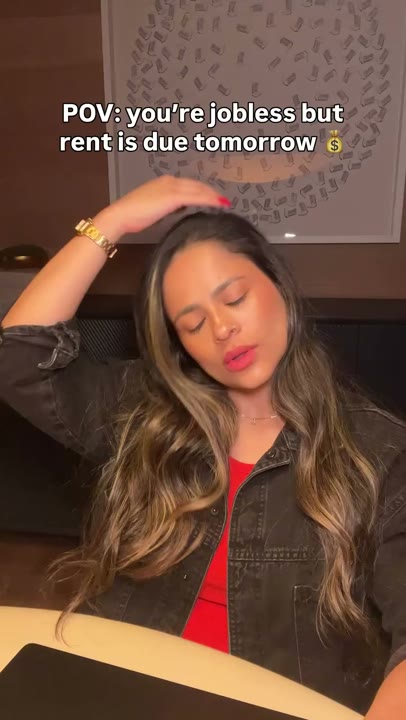
- The creator sits at a desk with eyes closed, touching and rubbing their head, then lowers a hand toward the laptop; around 2.6 seconds, the shot cuts to a Google Maps search with a pen pointing at the screen.
- On-screen text
- “POV: you’re jobless but rent is due tomorrow 💰 / go to Google Maps 📍”
- Spoken line
- None: no speech in the opening
- Sound
- Background pop music with female singing vocals, according to the prior analysis; no creator speech detected.
Script beats
A rent-due POV overlay accompanies closed eyes and head rubbing at a desk.
Make financial pressure immediately recognizable and establish urgency
Cut to a Google Maps search, with a pen pointing at the screen.
Introduce a concrete action while leaving its connection to earning money unresolved
Show a restaurant listing with the instruction to find a nice restaurant.
Identify the prospective customer and simplify the first research step
Show the restaurant listing’s share dialog and instruct viewers to copy the link.
Give a small, reproducible next step
Show OpenArt Director with a Maps link and a restaurant-video prompt.
Reveal the AI tool and demonstrate the input workflow
Restaurant and food clips appear alongside a claim about generating a walkthrough video up to five minutes long.
Present the proposed deliverable and make the result tangible
Continue the restaurant montage with the instruction to sell to the restaurant owner.
Resolve the earning-money setup with a proposed sales step, without demonstrating an actual sale
Why it works
- self-recognition. The jobless-and-rent-due scenario names a familiar financial worry before introducing any software.
- deadline urgency. “Tomorrow” makes the problem feel immediate and gives viewers a reason to seek the next step.
- visible emotion. Closed eyes and head rubbing make the text’s stress readable without spoken explanation.
- unresolved connection. The early Google Maps cut makes viewers wonder how a map search could help solve the financial problem.
How to adapt it
- urgent problem. For a meal-planning app: “POV: dinner is in 20 minutes but the fridge is empty”; for a clothing steamer: “POV: your interview starts soon and your shirt is wrinkled.”
- first solution action. Cut from the stressed reaction to entering ingredients in an app, filling a steamer, or opening a scheduling tool.
- demonstration steps. Use two or three readable actions: select a recipe, follow the cooking steps, show dinner; or fill, steam, reveal the shirt.
- payoff. Show a completed meal, a visibly smoother shirt, or a finished client asset; demonstrate outcomes the footage can substantiate.
- Keep intact.
- A short POV overlay naming a recognizable problem and a near deadline
- An immediately readable physical reaction that matches the problem
- A cut to the first practical action within roughly three seconds
- A visible sequence connecting the solution to the opening problem
Pattern template
POV: you’re [problem] but [deadline] → stressed reaction → cut to [first product action] → [simple steps] → [visible payoff]
Keywords and tags
- Audience
- People seeking freelance income ideas and creators interested in making restaurant videos with AI.
- Angles
- Relatability, Curiosity, Fear
- Call to action
- Comment “maps” to receive the creator’s prompt for free.
- Sound
- Music only
Video and caption by @saralunaugc; original post on Instagram. Breakdown by UGC Growth Engineer, added .