ChatGPTAI app presented as ChatGPT 6 AstraViewmaxViewmax Studio game-generation pluginStripepayment service for a game paywall
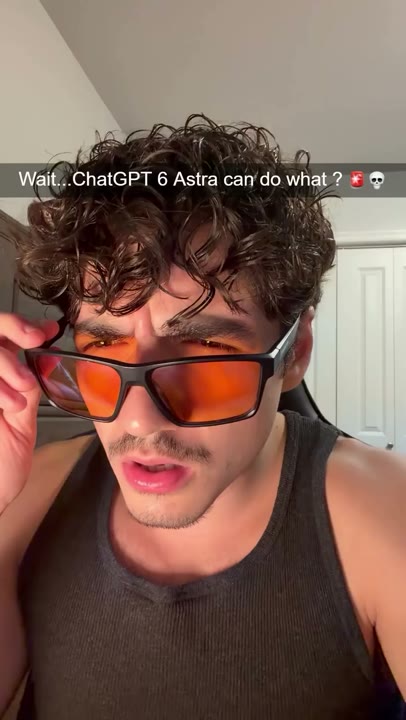
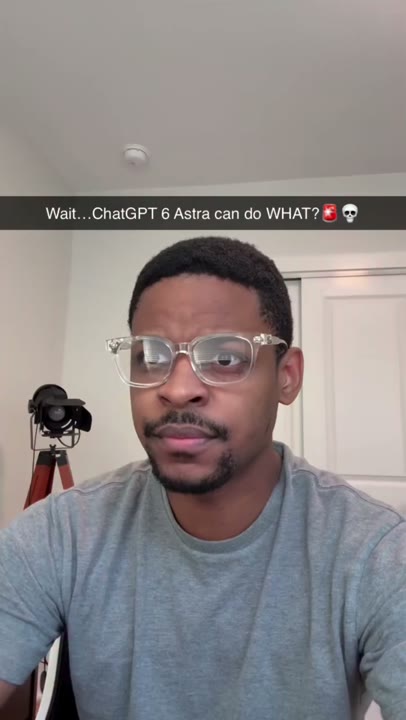
A Glasses-Off Reaction Teases an AI Drawing-to-Game Demo
A selfie reaction hooks viewers with a glasses-off double take and an unanswered AI capability question, then cuts to a drawing-to-game software demo.
- Views
- 74.7K
- Likes
- 1.6K
- Comments
- 1.4K
- Length
- 32s
Observed : 74,733 views, 1,605 likes, 1,429 comments. Published . An Instagram view is a play of a video (Reels); images and carousels have no views.
First 3 seconds
- Visual
- The creator shifts from a neutral expression to wide-eyed disbelief, reaches for their glasses, removes them, and cuts to drawing a car in a notebook by 3 seconds.
- On-screen text
- “Wait...ChatGPT 6 Astra can do WHAT?🚨💀”
- Spoken line
- “Draw whatever you like”
- Sound
- The prior analysis reports a subtle dramatic sound effect or riser, followed by instructional voiceover beginning around 2.7 seconds.
Script beats
The creator performs a skeptical double take and removes their glasses beneath an AI capability teaser.
Stop the scroll through a visible reaction and leave the capability unresolved
A notebook car drawing is shown, followed by a phone photographing it.
Introduce a simple starting input viewers could reproduce
The voiceover directs viewers to ChatGPT plugins and names a plugin; the laptop shows the plugins interface.
Connect the ordinary drawing to the featured software workflow
The laptop shows the drawing uploaded alongside a prompt to create a playable game.
Explain the transformation step and build anticipation for the output
A racing game appears on the laptop, with Viewmax Studio and GPT 6 ASTRA labels visible.
Provide a visual payoff for the drawing-to-game premise
The voiceover proposes publishing the game and adding a Stripe paywall; a Total Revenue graphic shows $10,873.58.
Shift from a capability demo to an earnings claim, without independently establishing that claim
The creator gestures toward the viewer while the narration transitions into an offer of instructions.
Turn interest in the result into interest in a guide
Why it works
- visible disbelief. The widening eyes and glasses removal make the reaction legible before viewers need to understand the software.
- unresolved capability. The overlay names an AI tool but withholds what it can do, giving viewers a concrete reason to keep watching.
- quick demonstration. The cut to a basic notebook drawing moves the teaser into a process within roughly three seconds.
- input-to-output payoff. The drawing and later racing game make the promised transformation visually understandable.
How to adapt it
- Featured capability. Tease a photo editor removing a background, a scanner app converting handwriting to text, or a cleaning product lifting a visible stain.
- Reaction gesture. Remove glasses, lean closer to the screen, pause mid-sip, or look from the product back to the camera.
- Simple starting input. Show an unedited photo, handwritten shopping list, stained fabric swatch, or tangled section of hair.
- Demonstration payoff. Reveal the edited image, converted text, cleaned swatch, or detangled hair with framing that makes the change easy to compare.
- Guide offer. Invite viewers to comment a relevant keyword for a workflow guide, product routine, or settings checklist.
- Keep intact.
- Show a readable facial reaction immediately
- Pair the reaction with a specific capability teaser
- Make the double take visibly change over the opening seconds
- Cut to a concrete demonstration around the three-second mark
Pattern template
Wait...[product] can do WHAT? → [disbelief gesture] → [simple input] → [demonstrated result] → comment [keyword] for [guide].
Keywords and tags
- Audience
- People interested in AI tools, creating games, and online side hustles.
- Angles
- Curiosity, Surprise, Aspiration
- Call to action
- Just comment Astra and I'll send it to you for free.
- Sound
- Unknown
Video and caption by @farcreates; original post on Instagram. Breakdown by UGC Growth Engineer, added .