Sparkiautomated video editing websiteCapCutvideo editing app
Manual Editing Frustration Sets Up an Automated Tool Demo
A couch-shot text-overlay skit hooks creators with frustration about manual video editing, then demonstrates an automated editing website.
- Views
- 148K
- Likes
- 1.9K
- Comments
- 152
- Length
- 14s
Observed : 148,216 views, 1,903 likes, 152 comments. Published . An Instagram view is a play of a video (Reels); images and carousels have no views.
First 3 seconds
- Visual
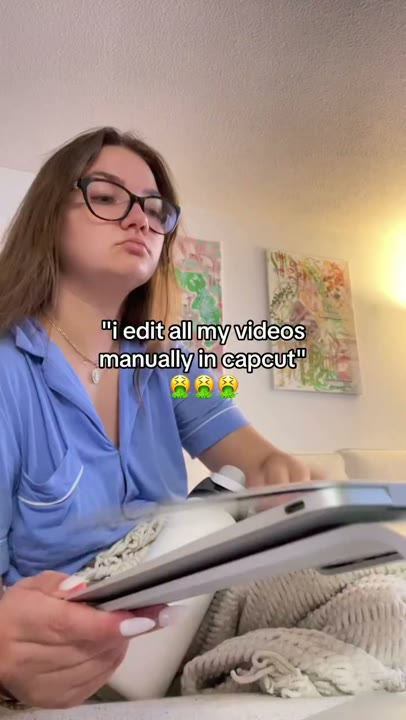
- The creator sits on a sofa in a blue shirt and glasses, opens a laptop, then holds a deadpan, displeased expression with one hand raised.
- On-screen text
- “"i edit all my videos manually in capcut" 🤮🤮🤮”
- Spoken line
- None: no speech in the opening
- Sound
- A rhythmic track with rap vocals; the transcript appears to capture lyrics rather than creator speech.
Script beats
The creator opens a laptop beneath a quoted statement about editing every video manually in CapCut.
Introduce a recognizable creator workflow immediately
The creator maintains a displeased look and raised-hand reaction while the statement and vomiting emojis remain visible.
Turn the familiar workflow into an exaggerated frustration and suggest an alternative
Cut to a filmed laptop screen showing sparki.io with the overlay 'Go to this website'.
Reveal the proposed solution
The website's video format, aspect ratio and duration controls appear beneath 'select the video format'.
Make the process look concrete and approachable
A project interface appears with 'watch it edit for you'.
Present automation as the answer to manual editing
Lifestyle footage appears beneath 'your video is FULLY edited for you 🤫'.
Show an example output and reinforce the promised benefit
A coffee-and-glasses shot carries a request to comment 'Sparki' for the link.
Convert interest into a comment requesting access
Why it works
- self-recognition. The opening names a specific task that video creators recognize: manually editing every video.
- emotional shorthand. The displeased expression and vomiting emojis communicate frustration without requiring a voiceover.
- problem-to-solution progression. The reaction creates interest in an easier workflow, followed by the website and its controls.
- visible payoff. An example edited video gives the automation claim a tangible endpoint, although the frames cannot establish output quality.
How to adapt it
- Tedious task in the opening quote. For a cleaning product: 'i scrub every stain by hand'; for a scheduling app: 'i post everything manually'; for a meal service: 'i plan every lunch from scratch'.
- Solution demonstration. Show stain remover being applied, posts being scheduled in an app, or a ready-made lunch being unpacked.
- Proof of the benefit. Reveal the cleaned surface, a populated publishing calendar, or the finished meal after the demonstration.
- Setting and props. Use a laundry room with a stained shirt, a desk with a phone, or a kitchen counter with lunch containers.
- Closing action. Ask viewers to comment 'CLEAN', 'PLAN' or 'LUNCH' for the relevant product link.
- Keep intact.
- Name a specific, recognizable manual task in the opening overlay
- Pair the quoted task with a clearly displeased reaction
- Keep the opening text readable from the first frame
- Follow the frustration with a concrete solution demonstration and visible result
Pattern template
"i [do tedious task] manually" + [displeased reaction] → [show product] → [simple process] → [finished result] → [CTA]
Keywords and tags
- Audience
- Video creators who find manual editing tedious
- Angles
- Relatability, Humor, Curiosity
- Call to action
- comment “Sparki” for the link🔗✨
- Sound
- Music only
Video and caption by @michelleeditorr; original post on Instagram. Breakdown by UGC Growth Engineer, added .