Revephoto-editing app
A Digicam POV Hook With Instant Flash-Effect Comparisons
A photo-editing app demo hooks viewers with a relatable missing-digicam POV, then compares original photos with flash-style edits.
- Views
- 255K
- Likes
- 11.8K
- Comments
- 76
- Length
- 10s
Observed : 254,667 views, 11,779 likes, 76 comments. Published . An Instagram view is a play of a video (Reels); images and carousels have no views.
First 3 seconds
- Visual
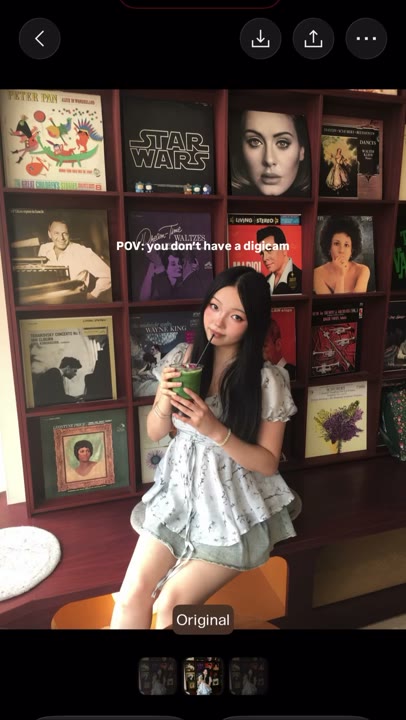
- An app preview shows the creator posing with a green drink against a record-cover wall, switches from the original to a flash-style edit, then cuts to a restaurant selfie preview.
- On-screen text
- “POV: you don’t have a digicam”
- Spoken line
- None: no speech in the opening
- Sound
- Upbeat pop music without creator voiceover, according to the prior analysis; the transcript's repeated words appear to be song vocals.
Script beats
The café portrait appears with the missing-digicam POV and an Original label.
Establish a recognizable aesthetic desire and a baseline image
The same portrait changes to the Camera Flash Effect preview.
Show an immediate visual solution before explaining the app
A restaurant selfie changes from Original to the darker, flash-lit Paparazzi style.
Repeat the comparison in another setting to make the effect easy to judge
A black screen displays the Reve mark and 'just use reve!'.
Connect the desired look to the featured app
The app interface shows style cards and instructions for story reframing and hard flash-style lighting.
Give viewers a brief view of the editing workflow
The café and restaurant edits return with 'results!' over the previews.
End on the visual payoff and reinforce the two demonstrated styles
Why it works
- self-recognition. The POV names a specific situation: wanting a digicam look without owning the camera.
- immediate visual proof. The first portrait changes within roughly a second, so viewers see the promised aesthetic quickly.
- controlled comparison. Showing the same photo with Original and effect labels makes the lighting change easy to understand.
- delayed solution reveal. The app name follows the examples, giving viewers a reason to stay to learn how the edits were made.
How to adapt it
- missing tool or capability. For an editing app, use 'POV: you don’t have studio lights'; for a phone lens, use 'POV: you don’t have a macro camera'.
- comparison subject. Use a café portrait, a jewelry close-up, or a skincare product flat lay, keeping the subject identical across the original and edited versions.
- desired result. Swap flash-style portraits for brighter product photos, cleaner backgrounds, or a film-style color treatment.
- solution demonstration. Show the actual app preset, phone-light placement, or lens attachment after the initial result comparison.
- call to action. Invite viewers to comment a preset name for instructions or save the demonstrated editing steps.
- Keep intact.
- Open with a short POV naming the viewer's missing tool and desired look
- Show a visible result change within the first three seconds
- Compare the same source image and clearly label the versions
- Reveal the solution after viewers have seen what it produces
Pattern template
POV: you don’t have [desired tool] → [original image] → [same image with desired effect] → use [product] → [workflow and results].
Keywords and tags
- Audience
- Phone photographers who want digicam-style photos without owning a digital camera
- Angles
- Relatability, Curiosity, Aspiration
- Call to action
- Comment ‘reve’ to receive the app link by DM.
- Sound
- Music only
Video and caption by @yiniala; original post on Instagram. Breakdown by UGC Growth Engineer, added .