Canvadesign platformCarousel StudioAI carousel generation app
Manual Carousel Design Frustration Leads Into an AI Tutorial
A deadpan typing scene hooks creators with frustration about manually designing Instagram carousels, then demonstrates an AI carousel app in Canva.
- Views
- 2.2M
- Likes
- 52K
- Comments
- 497
- Length
- 25s
Observed : 2,169,080 views, 51,972 likes, 497 comments. Published . An Instagram view is a play of a video (Reels); images and carousels have no views.
First 3 seconds
- Visual
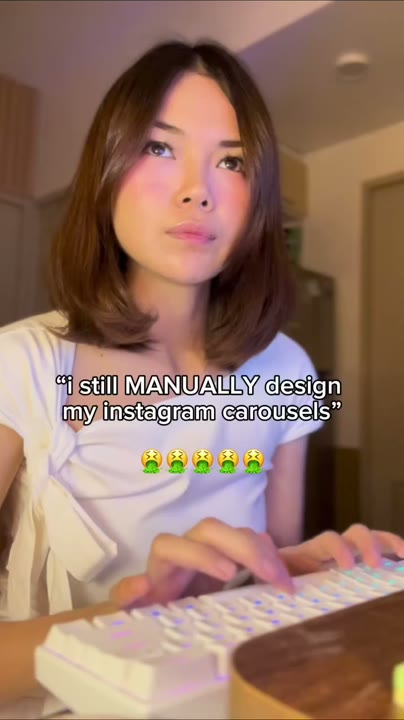
- The creator types on a white illuminated keyboard at a desk, shifts from an upward glance to direct eye contact, and gradually leans toward the camera with a deadpan expression.
- On-screen text
- ““i still MANUALLY design my instagram carousels” 🤮🤮🤮🤮🤮”
- Spoken line
- None: no speech in the opening
- Sound
- Upbeat background music with no creator dialogue, according to the prior audio analysis; the track cannot be identified from the frames.
Script beats
Typing at a desk under a quoted admission about manually designing Instagram carousels, with five vomiting emojis.
Make creators recognise a tedious habit and anticipate an easier alternative
Cut to a filmed tablet interface; create a new Canva post and select Instagram post.
Turn the frustration into an actionable workflow
Find Carousel Studio through Canva's apps interface using a stylus.
Reveal the tool that resolves the opening pain point
Show a carousel prompt in Carousel Studio and the instruction to click Generate.
Demonstrate the small amount of input required
Reveal generated carousel slides alongside a claim that the post is done in under one minute.
Provide a visible result and reinforce the time-saving promise
Show the carousel overview with an instruction to save the post for future projects.
Encourage saving the tutorial for later use
Why it works
- self-recognition. The quoted manual-design habit names a familiar frustration for people who regularly make Instagram carousels.
- visual reinforcement. Typing makes the manual work tangible, while the deadpan expression and vomiting emojis exaggerate the annoyance.
- unresolved alternative. Emphasising MANUALLY implies that a better workflow exists, giving viewers a reason to stay for the reveal.
- visible proof. The tutorial moves from app selection to generated slides, making the proposed shortcut concrete, though the frames do not verify the elapsed-time claim.
How to adapt it
- Tedious task. For a scheduling app: “i still MANUALLY post every day”; for expense software: “i still MANUALLY sort my receipts”; for a cleaning tool: “i still scrub this by hand”.
- Opening physical action. Type a repetitive task, sort a pile of receipts, or scrub a small stain while giving the camera a deadpan look.
- Product workflow. Follow the opening with three visible actions: upload receipts and categorise them, queue a week's posts, or apply a cleaning tool and show the result.
- Payoff. Show the finished carousel, a populated posting calendar, categorised expenses, or the cleaned surface; use a time claim only when demonstrated.
- Save prompt. Use “save this for your next content day” for software or “save this for your next kitchen clean” for a cleaning tutorial.
- Keep intact.
- Name a specific tedious habit in the opening overlay
- Show the creator physically performing that habit
- Keep the expression understated so the exaggerated emoji reaction supplies the humor
- Transition quickly from the pain point to a practical product workflow and visible result
Pattern template
“i still MANUALLY [tedious task]” + [deadpan performance and disgust emojis] → [product shortcut steps] → [finished result] → [save prompt]
Keywords and tags
- Audience
- Content creators and social media managers who spend time manually designing Instagram carousels
- Angles
- Relatability, Humor, Curiosity
- Call to action
- save this post for your future projects!; the caption also asks viewers to save the video and follow for more Canva tips.
- Sound
- Music only
Video and caption by @ellamakescarousels; original post on Instagram. Breakdown by UGC Growth Engineer, added .