SparkiAI video-editing websiteCapCutvideo-editing app referenced as the manual-editing alternative
Manual Editing Frustration Leads Into an AI Tool Demo
A text-overlay skit hooks video creators with frustration about manual editing, then cuts to a demo of an AI video-editing website.
- Views
- 577K
- Likes
- 14.7K
- Comments
- 3.1K
- Length
- 14s
Observed : 577,368 views, 14,731 likes, 3,079 comments. Published . An Instagram view is a play of a video (Reels); images and carousels have no views.
First 3 seconds
- Visual
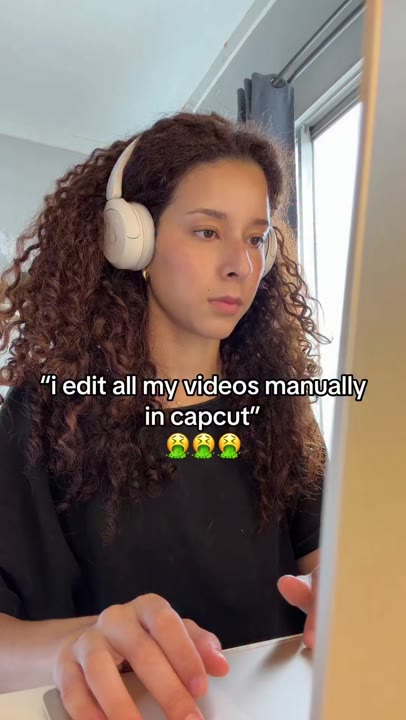
- The creator works at a laptop wearing white headphones, looks toward the camera, then removes the headphones with furrowed brows.
- On-screen text
- ““i edit all my videos manually in capcut” 🤮🤮🤮”
- Spoken line
- None: no speech in the opening
- Sound
- Upbeat hip-hop music with rap vocals; no creator speech is supported by the evidence.
Script beats
The creator sits at a laptop under an overlay about manually editing videos in CapCut.
Establish a familiar creator pain point immediately
The creator removes the headphones, holds them, and gives an annoyed, questioning reaction.
Turn the editing complaint into a visible rejection and invite curiosity about an alternative
Cut to a laptop displaying the Sparki website with 'go to this website'.
Reveal the proposed solution
The website demonstration shows vlog-style choices under 'select your vlog style'.
Make the workflow look approachable
Format controls appear with 'select the video format'.
Show how the output can be configured
An editing interface appears under 'watch it edit for you'.
Present automated editing as the payoff to the opening frustration
A sample vlog clip carries a comment-for-link prompt, followed by the same prompt on black.
Show an example output and convert interest into comments
Why it works
- self-recognition. The opening names a specific task that video creators may already find tedious.
- visible frustration. The headphone removal and furrowed brows communicate annoyance without spoken explanation.
- problem-to-solution curiosity. Rejecting manual editing creates a reason to stay for the alternative, which the website demo supplies.
- simple steps. Short instructional overlays make the proposed replacement workflow easy to follow.
How to adapt it
- Tedious task in the opening overlay. For a scheduling app: 'i post everything manually'; for a cleaning tool: 'i scrub this grout by hand'; for a meal kit: 'i plan every dinner from scratch'.
- Frustration gesture. Remove headphones, put down a cleaning brush, or close a meal-planning notebook while giving the camera an annoyed look.
- Solution demonstration. Show scheduling a week's posts, cleaning one grout line, or assembling one meal in two or three clearly labelled steps.
- Conversion prompt. Use 'comment [keyword] for the link' when a link-delivery workflow exists, or direct viewers to the product link in the profile.
- Keep intact.
- Put the specific tedious task on screen from the opening frame
- Make the frustrated reaction visible within the first three seconds
- Connect the demonstrated product directly to the opening task
- Follow the reaction quickly with a concrete solution demo
Pattern template
“i [tedious task] manually” + [negative emojis] → [frustrated gesture] → [product reveal] → [simple demo steps] → [CTA]
Keywords and tags
- Audience
- Video creators who want to reduce time spent manually editing their videos
- Angles
- Relatability, Humor, Curiosity
- Call to action
- comment “Sparki” for the link🔗✨
- Sound
- Music only
Video and caption by @ashley.editswai; original post on Instagram. Breakdown by UGC Growth Engineer, added .