VyraAI video editorClaudeAI assistant
An Editor Callout Turns AI Anxiety Into a Software Demo
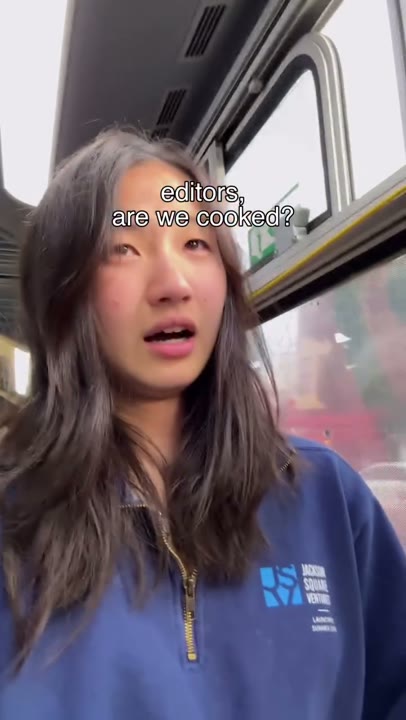
A transit selfie hooks video editors with “editors, are we cooked?” before cutting to a numbered demonstration of AI video-editing software.
- Views
- 439K
- Likes
- 3
- Comments
- 6.6K
- Length
- 14s
Observed : 438,856 views, 3 likes, 6,566 comments. Published . An Instagram view is a play of a video (Reels); images and carousels have no views.
First 3 seconds
- Visual
- The creator films a concerned-looking selfie on public transit, then cuts around 1.9 seconds to a laptop showing Claude and a video-editor connector.
- On-screen text
- “editors, are we cooked? / 1. connect this video editor to Claude”
- Spoken line
- None: no speech in the opening
- Sound
- Upbeat background music with no spoken voiceover, according to the prior analysis; the transcript detects no speech.
Script beats
A concerned transit selfie carries “editors, are we cooked?”
Identify the intended audience immediately and raise a question about its future
Cut to a laptop and show connecting the video editor to Claude.
Reveal the source of the concern and begin a concrete workflow
Show the editing app and a file-selection window under “2. upload all your raw footage”.
Make the starting action look accessible and reproducible
An editing timeline and video preview appear with “4. let it cook”.
Show the software working toward an edited result; intermediate steps are not legible in the supplied evidence
Show Claude beside the editing interface with “5. re-prompt to make any changes”.
Present conversational revision as part of the workflow
Finish on the laptop workflow with “7. comment “edit” and I’ll send you the link!”
Convert interest into a keyword comment requesting access
Why it works
- audience identification. “editors” tells a specific professional audience that the next few seconds concern them.
- unresolved threat. “are we cooked?” suggests an unsettling change without explaining it, encouraging viewers to watch the reveal.
- emotional framing. The creator’s concerned expression makes the question feel personal before the software appears.
- fast visual proof. The laptop cut within roughly two seconds connects the emotional opening to a visible editing workflow.
How to adapt it
- Audience. For a design app, use “designers, are we cooked?”; for a meal-planning app, use “meal preppers, are we cooked?”
- Product capability. Show raw clips becoming a timeline, a brief becoming a design, or pantry ingredients becoming a meal plan.
- Opening setting. Record a phone selfie at a desk, on a commute, or in a kitchen before cutting to the product.
- Numbered workflow. Use three visible steps such as “upload your clips”, “describe your edit”, and “review the result”.
- Response keyword. Invite viewers to comment “edit”, “design”, or “recipe” for the relevant product link.
- Keep intact.
- Name a specific audience in the opening overlay
- Pair the unresolved question with an expressive selfie
- Reveal the product workflow within approximately two seconds
- Show a capability that explains the opening concern
Pattern template
[audience], are we cooked? → concerned selfie → [product capability] demo → [simple steps] → comment “[keyword]” for the link
Keywords and tags
- Audience
- Video editors and content creators curious or concerned about AI editing tools
- Angles
- Curiosity, Fear, Relatability
- Call to action
- comment “edit” and I’ll send you the link!
- Sound
- Music only
Video and caption by @sulansart; original post on Instagram. Breakdown by UGC Growth Engineer, added .