HiggsfieldAI video platform and MCP connectorClaudeAI assistantYouTubevideo publishing platformGooglesearch engine
Shocked Laptop Reaction Followed by AI Workflow Proof
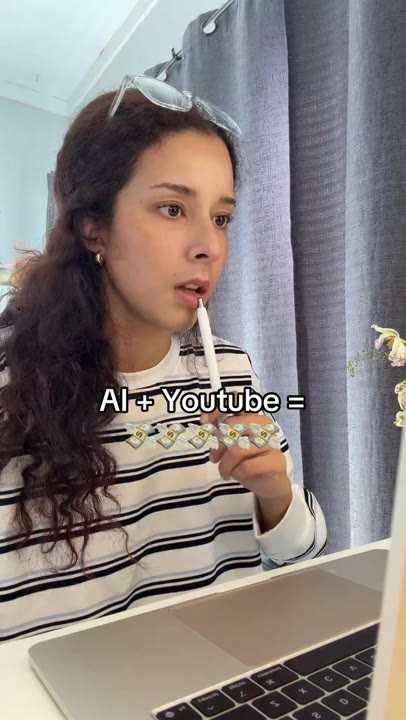
A shocked laptop reaction and an unfinished AI-plus-YouTube equation hook viewers before a text-led demonstration of an AI video workflow.
- Views
- 133K
- Likes
- 3.1K
- Comments
- 219
- Length
- 21s
Observed : 132,935 views, 3,128 likes, 219 comments. Published . An Instagram view is a play of a video (Reels); images and carousels have no views.
First 3 seconds
- Visual
- The creator looks toward a laptop with a stylus near their mouth, then opens their mouth in surprise; the video cuts to YouTube thumbnails and view counts highlighted with the stylus.
- On-screen text
- “AI + Youtube = 💸💸💸💸💸 / it's called a faceless Youtube Channel / and these types of channels are making 💰💰”
- Spoken line
- None: no speech in the opening
- Sound
- Upbeat instrumental music without voiceover, according to the prior analysis; the transcript detects no speech.
Script beats
The creator reacts to the laptop beneath an AI-plus-YouTube equation and money emojis.
Stop the scroll with an expressive face and create curiosity about the apparent earning opportunity
Cut to history-video thumbnails, introduce faceless YouTube channels, and point toward large view counts.
Connect the reaction to visible examples and introduce the money claim
Show a Google search about payment for one million YouTube views and point toward a displayed revenue range.
Increase interest through potential earnings, without establishing actual channel income
Show the Higgsfield MCP setup page with the instruction 'copy this'.
Introduce the tool connection that makes the proposed workflow actionable
Show a Claude prompt beneath 'type in this prompt'.
Turn the opportunity into a seemingly simple instruction
Add a screenshot of the reference channel beneath 'add the screenshot'.
Provide a visual reference for the generated content
Play a historical throne-room video on the laptop beneath 'the result is insane🔥'.
Close the workflow loop with a visible output
Why it works
- expressive reaction. The creator's widening eyes and open mouth signal that something on the laptop deserves attention before viewers know what it is.
- unfinished equation. The AI-plus-YouTube overlay compresses the premise into a quick visual relationship, while money emojis suggest the benefit.
- rapid evidence reveal. The cut to thumbnails and view counts gives the reaction a concrete referent, although views do not verify earnings.
- guided attention. The stylus directs viewers toward specific screen details instead of leaving them to scan a crowded interface.
How to adapt it
- opening equation. Use 'meal planner + leftovers =' with a savings cue, or 'editing app + phone footage =' with a polished-video cue.
- screen reveal. Reveal an editing app's finished clip, a budgeting app's spending comparison, or a design tool's completed invitation.
- proof detail. Point to a measured time saving, an actual price comparison, or a clearly visible before-and-after result.
- short workflow. Show importing footage, selecting a preset, and exporting; or adding ingredients, choosing a recipe, and generating a shopping list.
- final payoff. End on the exported video, completed design, or prepared meal that explains the opening reaction.
- Keep intact.
- Make the facial reaction readable immediately
- Pair the reaction with a short overlay that establishes the benefit
- Reveal the object of the reaction within roughly two seconds
- Highlight one meaningful detail in each screen shot with a pointer or tight framing special enough to be readable on a phone screen
Pattern template
[tool] + [task] = [benefit cue] → surprised reaction → point to [visible evidence] → show [short workflow] → reveal [result]
Keywords and tags
- Audience
- Creators interested in making faceless YouTube videos with AI tools and exploring potential monetization.
- Angles
- Curiosity, Surprise, Aspiration
- Call to action
- On-screen instructions: 'copy this', 'type in this prompt', and 'add the screenshot'.
- Sound
- Music only
Video and caption by @productiveashley; original post on Instagram. Breakdown by UGC Growth Engineer, added .