ClaudeAI assistantVibizAI marketing ad generation connectorCanvadesign platform connector
A Disbelief Reaction Leads Into an AI Ad-Making Tutorial
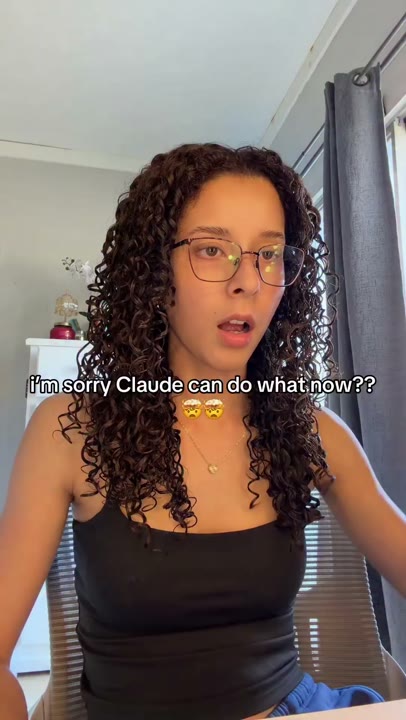
A shocked selfie reaction and an incredulous Claude text overlay create curiosity before a laptop tutorial shows an AI workflow for generating marketing ads.
- Views
- 1.3M
- Likes
- 25.7K
- Comments
- 5.8K
- Length
- 21s
Observed : 1,257,887 views, 25,742 likes, 5,775 comments. Published . An Instagram view is a play of a video (Reels); images and carousels have no views.
First 3 seconds
- Visual
- The creator sits with an open-mouthed expression, lifts a hand to their glasses, and removes them by 2 seconds; at 3 seconds, the view shows a laptop browser opening Claude.
- On-screen text
- “i’m sorry Claude can do what now?? 🤯🤯 / go to Claude”
- Spoken line
- None: no speech in the opening
- Sound
- Upbeat electronic instrumental music with no dialogue, according to the prior audio analysis; the transcript detects no speech.
Script beats
The creator reacts in disbelief and removes their glasses beneath the Claude capability question.
Stop the scroll with a readable facial reaction and leave the capability unspecified
Cut to the laptop, open Claude, and show the custom connector setup.
Turn curiosity into an actionable walkthrough
Show Vibiz.ai documentation and connect its endpoint through Claude's custom connector dialog.
Reveal the integration behind the promised capability
Show Claude's prompt box with instructions to paste a company or client's website; offer the prompt link to viewers who comment “vibe.”
Make the workflow relevant to viewers' businesses and invite comments
Show a longer generated response outlining marketing ad concepts, paired with “and in just a few mins...”
Bridge the setup to the claimed time-saving outcome
Display finished real-estate marketing ad layouts and promise many professional-looking ads.
Resolve the opening curiosity with visible output examples
Why it works
- visible disbelief. The open mouth and glasses-removal gesture communicate surprise before viewers finish reading.
- withheld capability. The overlay names Claude but leaves what it can do unanswered, giving viewers a reason to continue.
- rapid practical payoff. The early cut to a real laptop workflow moves directly from reaction to instructions.
- visible outcome. Finished ad layouts give the capability question a concrete payoff rather than ending with setup steps.
How to adapt it
- Featured product. Use “i’m sorry [budgeting app] can do what now??” before showing automatic expense grouping, or feature a photo editor before demonstrating object removal.
- Reaction gesture. Remove glasses, lean toward the screen, or pause mid-sip with an open-mouthed double take.
- Demonstration. Show two or three steps: upload a photo and remove its background, import receipts and generate a report, or enter a brief and produce an ad.
- Final proof. End on the edited photo, completed expense report, or finished branded ad so viewers can assess the result.
- Comment incentive. Offer a genuinely available prompt, setup guide, or template using a relevant comment keyword.
- Keep intact.
- Pair the opening disbelief expression with the capability-question overlay immediately
- Name the product while withholding the specific capability
- Cut to the demonstration within roughly the first three seconds
- Finish with a clearly visible result that answers the opening question
Pattern template
“i’m sorry [product] can do what now??” + [disbelief gesture] → [short setup walkthrough] → [visible result] → [optional resource CTA]
Keywords and tags
- Audience
- Business owners, marketers, and creators interested in making ads with AI tools
- Angles
- Surprise, Curiosity, Aspiration
- Call to action
- comment “vibe” and i’ll send you the link
- Sound
- Music only
Video and caption by @ashleyloves.ai; original post on Instagram. Breakdown by UGC Growth Engineer, added .