Canvadesign softwareFabbler.aiAI Faceless Video appUnbrandedCanva cash course
Shocked Laptop Reaction Before a Canva Tutorial
A shocked laptop reaction and a promise-led text overlay build curiosity before a screen-recorded tutorial demonstrates a Canva AI video app.
- Views
- 172K
- Likes
- 2.5K
- Comments
- 4.3K
- Length
- 33s
Observed : 171,759 views, 2,504 likes, 4,342 comments. Published . An Instagram view is a play of a video (Reels); images and carousels have no views.
First 3 seconds
- Visual
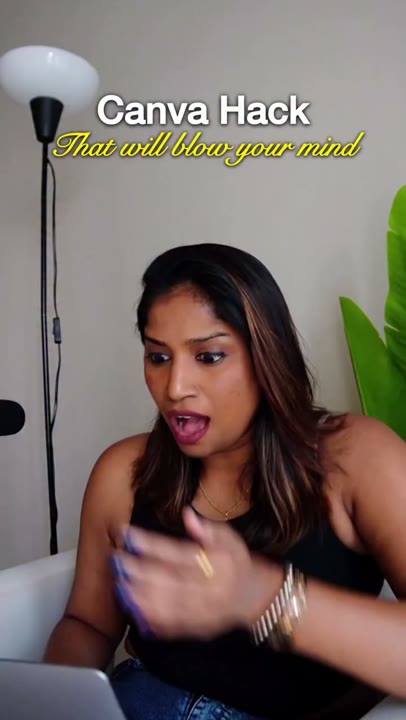
- The creator looks at a laptop with an open mouth, covers their mouth, then turns wide eyes toward the camera; “Part 50” appears by 2 seconds.
- On-screen text
- “Canva Hack That will blow your mind Part 50”
- Spoken line
- None: no speech in the opening
- Sound
- The prior analysis reports background music during the reaction and a later tutorial voiceover; exact opening speech timing is uncertain.
Script beats
Open-mouthed surprise becomes a hand-over-mouth reaction beside a laptop, under the Canva hack promise.
Stop scrolling through an expressive reaction and create curiosity about the unseen discovery
“Part 50” appears; the creator faces the camera and touches their forehead before a zoom transition.
Extend the reaction and lead into the promised explanation
The tutorial introduces Canva’s AI Faceless Video app, the Create tab, category selection and duration.
Resolve the initial curiosity with actionable software steps
Art style, language and subtitle font settings are explained, followed by generation and adding to a design.
Show customization and make the workflow feel reproducible
The voiceover claims the generated content can be uploaded to YouTube and Instagram to start earning; footage returns to the creator at a laptop.
Connect the workflow to an aspirational benefit
The creator promotes a Canva cash course and asks viewers to comment “Canva” to receive it.
Convert tutorial interest into comments and course enquiries
Why it works
- expressive surprise. The open mouth, covering gesture and wide eyes communicate a discovery before the viewer knows what happened.
- withheld cause. The laptop hides the cause of the reaction, while the overlay identifies Canva as the topic.
- quick explanation. The transition into app settings gives viewers a concrete reason to keep watching after the exaggerated opening.
How to adapt it
- Product discovery. React to a budgeting app automatically sorting expenses, a photo editor removing an object, or a cleaning tool revealing a cleared patch.
- Hook overlay. Use “Photo editing shortcut” or “One setting I wish I knew,” followed by a specific, demonstrable benefit.
- Tutorial payoff. Follow the reaction with a screen recording of two app steps or a close-up showing how the product produces the result.
- Closing action. Ask viewers to save the steps, try the feature, or comment a keyword for a relevant guide.
- Keep intact.
- Make the surprise visible immediately
- Name the product or task in readable opening text
- Briefly withhold the cause of the reaction
- Transition promptly into a demonstration that explains the reaction
Pattern template
[Surprised reaction to off-screen result] + “[product] [shortcut promise]” → [show the steps] → [benefit and relevant CTA]
Keywords and tags
- Audience
- Creators interested in Canva shortcuts and AI video creation.
- Angles
- Surprise, Curiosity, Aspiration
- Call to action
- Comment down below Canva, I will send it to you.
- Sound
- Voice and music
Video and caption by @shruthy_suvarna; original post on Instagram. Breakdown by UGC Growth Engineer, added .