No product featured
Autocorrect Turns a Simple Text into a Two-Role Comedy Skit
A text-overlay skit hooks viewers with a familiar typing moment, then personifies autocorrect to reveal an unwanted word swap and an annoyed reaction.
- Views
- 2.5M
- Likes
- 221K
- Comments
- 886
- Length
- 12s
Observed : 2,486,862 views, 221,039 likes, 886 comments. Published . An Instagram view is a play of a video (Reels); images and carousels have no views.
First 3 seconds
- Visual
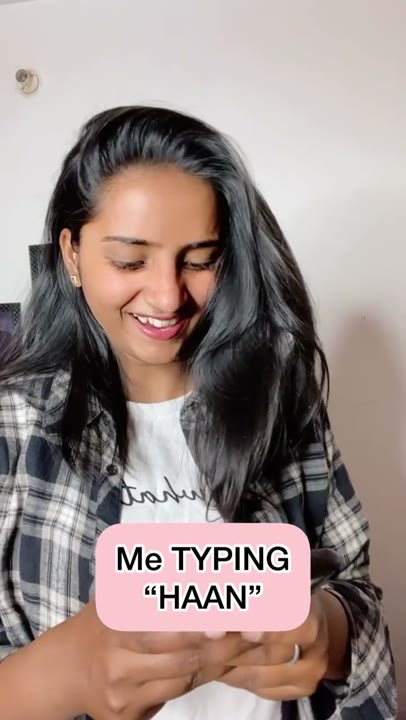
- The creator smiles while typing on a phone, then switches from a plaid overshirt to a white T-shirt to play autocorrect with a knowing smile.
- On-screen text
- “Me TYPING “HAAN” / Autocorrect *”
- Spoken line
- None: no speech in the opening
- Sound
- Background music according to the prior analysis; no opening speech detected.
Script beats
The creator types on a phone; the overlay 'Me TYPING “HAAN”' is visible by 0.5 seconds.
Establish an everyday texting situation viewers recognise
The creator switches roles and clothing; 'Autocorrect *' appears, followed by '“JAAN”'.
Personify the interference and reveal the unwanted word replacement
Back in the plaid overshirt, the creator looks down at the phone with a confused, frustrated expression under '“JAAN”'.
Show the consequence and build comic contrast with the cheerful setup
The creator looks outward in exasperation with the overlay 'Tu hi likh le Aashiq saale 🙂'.
Deliver the text-based retort to autocorrect
The autocorrect character returns with a startled expression in a desaturated shot.
End on a reaction punchline
Why it works
- self-recognition. Typing a simple message is instantly familiar, and the autocorrect label names a common frustration.
- unresolved question. Introducing autocorrect before revealing its replacement gives viewers a reason to keep watching.
- personification. A clothing change turns a phone feature into a mischievous character without requiring another performer.
- emotional contrast. The shift from smiling to annoyed, followed by autocorrect's shocked reaction, makes the error a compact comic story.
How to adapt it
- Everyday task. Use 'Me writing a client email' for a writing app or 'Me making a shopping list' for a grocery app.
- Interfering character. Play autocorrect, distracting notifications, or an overflowing notes app using a different shirt and a clear role label.
- Mistake and product resolution. Show a wrong word before demonstrating a writing app's correction, or a forgotten grocery item before revealing a shared-list feature.
- Reaction punchline. Respond with an annoyed stare, a short text retort, or a satisfied look after the product fixes the problem.
- Keep intact.
- Establish the ordinary task with readable text in the opening seconds
- Introduce the interfering character before revealing the mistake
- Make the two roles visually distinct
- Show the unwanted result and an expressive reaction
Pattern template
Me [doing everyday task] → [interfering feature] takes over → [unwanted result] → [annoyed retort or product fix] → [reaction punchline].
Keywords and tags
- Audience
- People who text and recognise frustrating autocorrect mistakes
- Angles
- Relatability, Humor, Curiosity
- Call to action
- Caption hashtag encourages sharing with friends.
- Sound
- Music only
Video and caption by @devika029; original post on Instagram. Breakdown by UGC Growth Engineer, added .